For many B2B companies, offering credit is crucial for building strong customer relationships and driving sales. However, managing credit limits manually is risky. Without an automated system, customers can easily exceed their allowed credit, creating financial exposure for your business.
Shopify does not offer a native solution to automatically track a company’s available credit or prevent orders that exceed it. This forces manual reconciliation, leads to potential overspending, and increases the risk of late payments.
The ideal solution is a dynamic system that tracks each company’s credit usage, enforces limits during checkout, and automatically restores credit when invoices are paid. This protects your business from credit overextension while ensuring a smooth ordering experience for your B2B customers.
A Native Shopify Solution: Flow and Metafields
Fortunately, you can implement this solution using Shopify’s first-party Flow app and metafields—no third-party apps are required. By leveraging these built-in tools, you create an automated system for real-time credit tracking and enforcement.
The entire setup revolves around two essential Company metafields:``
credit.limit- The maximum amount a company is allowed to owe at any given time.
credit.debt- The amount the company currently owes.
The available credit is simply calculated by subtracting the debt from the limit. Shopify Flow then automates the two key actions required to keep these values accurate:
- Increase Credit Debt: When a new, unpaid order is created, the system immediately accounts for the order total.
- Decrease Credit Debt: When an order is paid, the available credit is automatically restored, allowing for new orders.
With just these two flows, you gain real-time credit control that protects your business while keeping the ordering experience seamless for your customers.
Configuring Shopify (Step by step)
Step 1: Create Company metafields
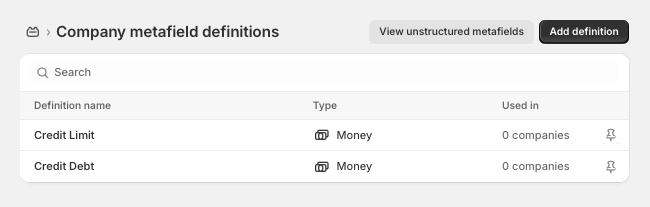
First, create the following Company metafields.
| Name | Namespace and key | Description | Type |
|---|---|---|---|
| Credit Limit | credit.limit |
The company’s total credit limit. | Money |
| Credit Debt | credit.debt |
The amount the company owes. | Money |
Note: The prebuilt Flow files linked in the next step assume you use the credit namespace and the limit/debt keys as shown above.
It should look like this:
Step 2: Install the Flows
For ease of installation, you can download the two necessary Flow files below and import them directly into the Shopify Flow app. A detailed explanation of each flow follows.
Order Created - Increase Company Debt Order Paid - Decrease Company Debt
Flow: Order Created - Increase Company Debt
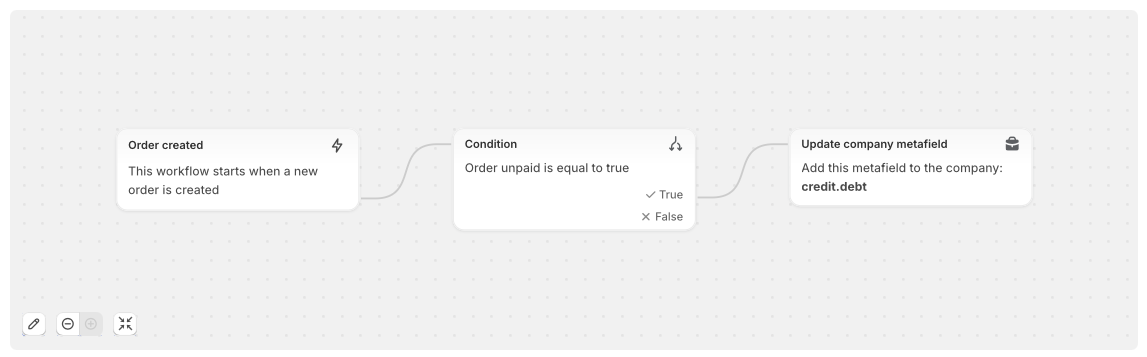
This flow immediately increases a company’s credit debt when a new, unpaid order is placed, preventing them from exceeding their limit with subsequent orders.
Flow Steps:
- Trigger
-
- The flow starts when an order is created (
shopify::admin::order_created).
- The flow starts when an order is created (
- Condition
-
- Checks if the order is unpaid and is associated with a B2B company.
- Action
-
- Retrieves the company’s current
credit.debtmetafield. - Calculates the new debt by adding the order total to the existing debt.
- Updates the
credit.debtmetafield with this new value.
- Retrieves the company’s current
Liquid Code:
{%- assign order_total = order.currentTotalPriceSet.presentmentMoney.amount -%}

{%- assign starting_debt = 0 -%}
{%- for metafield in order.purchasingEntity.PurchasingCompany.company.metafields -%}
  {%- if metafield.namespace == "credit" and metafield.key == "debt" -%}
    {%- assign starting_debt = metafield.value -%}
  {%- endif -%}
{%- endfor -%}

{%- assign ending_debt = starting_debt | plus: order_total -%}

{{ ending_debt }}
Flow: Order Paid - Decrease Company Debt
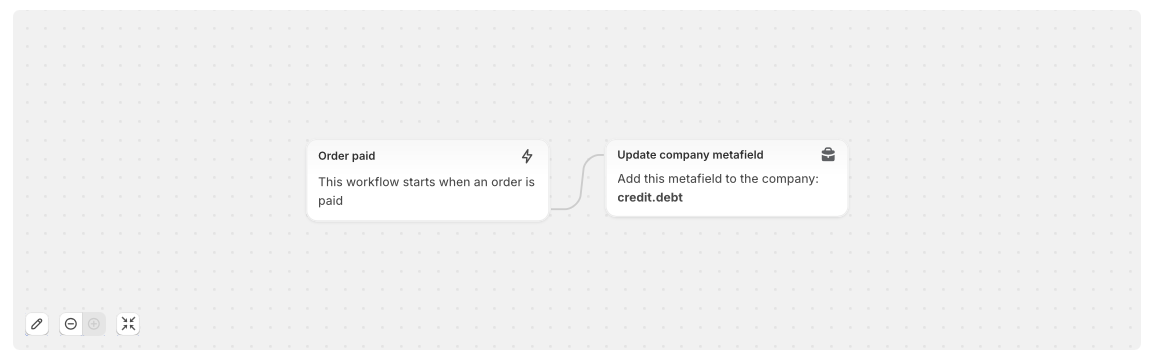
When an order is marked as paid, this flow automatically reduces the company’s credit debt, restoring their available credit.
Flow Steps:
- Trigger
-
- The flow starts when an order is marked as paid (
shopify::admin::order_paid).
- The flow starts when an order is marked as paid (
- Action
-
- Retrieves the company’s current
credit.debtmetafield. - Calculates the new debt by subtracting the paid order total from the existing debt.
- Ensures the debt does not go below zero (i.e., clamps the minimum debt at 0).
- Updates the
credit.debtmetafield with this new value.
- Retrieves the company’s current
Liquid Code:
{%- assign order_total = order.currentTotalPriceSet.presentmentMoney.amount -%}

{%- assign starting_debt = 0 -%}
{%- for metafield in order.purchasingEntity.PurchasingCompany.company.metafields -%}
  {%- if metafield.namespace == "credit" and metafield.key == "debt" -%}
    {%- assign starting_debt = metafield.value -%}
  {%- endif -%}
{%- endfor -%}

{%- assign calculated_debt = starting_debt | minus: order_total -%}
{%- if calculated_debt < 0 -%}
  {%- assign ending_debt = 0 -%}
{%- else -%}
  {%- assign ending_debt = calculated_debt -%}
{%- endif -%}

{{ ending_debt }}
Step 3: Prevent Checkout
With the flows in place to accurately track credit debt, the final step is to prevent customers from completing an order that exceeds their available credit.
You can combine multiple strategies to create a user-friendly and robust enforcement system:
- Display Available Credit
- Show the customer their current Credit Limit, Credit Debt, and remaining available credit in the cart, minicart, or account dashboard. This transparency helps them self-manage their spending.
- Block Checkout via Cart Validation
- On the cart page, compare the cart total to the available credit. If the order exceeds the limit, display an error message and disable the checkout button. This provides immediate, client-side feedback.
- Enforce Limits with Shopify Functions (Plus)
- For Shopify Plus stores, use Shopify Functions or checkout scripts to enforce the credit limit at the final checkout step. This is the ultimate guardrail, preventing the order from completing even if a customer bypasses the cart validation.
By combining these strategies, you create a seamless, user-friendly experience that informs customers of their limits while protecting your business from overextension.