If you’re a designer or a merchant, the request sounds trivial:
“I want a heart icon that turns red when a product is in a wishlist and removes it when clicked again.”
It’s a familiar interaction—something you’ve seen on Pinterest, Instagram, and just about every modern ecommerce experience. A clean, satisfying toggle. One click to save, one click to undo.
But if you’re a developer on BigCommerce, you’ll quickly discovered that this “simple” interaction is anything but simple. In fact, it exposes deeper architectural decisions within the platform itself.
This post explains why BigCommerce’s wishlist system—ironically, because it’s more powerful than most—makes this pattern difficult, and what your realistic options are for building it.
The Heart of the Issue
Paradoxically, the limitation at the core of this problem is one of BigCommerce’s strengths: its native wishlist system supports multiple wishlists per customer.
A shopper isn’t limited to a single “Saved Items” list—they can maintain a “Birthday List,” a “Holiday List,” or even a “Dream Home List.” From a product perspective, this is powerful and flexible, enabling richer shopping journeys.
But that flexibility comes at a cost.
A Pinterest-style heart toggle assumes a binary state: a product is either saved or it isn’t. BigCommerce asks:
“Which wishlist should this product be added to?”
That shift—from one state to multiple possible destinations—breaks the simplicity that a one-click toggle relies on. What appears boolean at the UI level is, under the hood, a multi-dimensional decision.
Staying “Active” Is Hard
To render a heart as “filled,” the frontend needs to know if the product already exists in any wishlist.
- BigCommerce’s Storefront APIs don’t provide this info directly.
- BigCommerce’s Management API can, but only with server-side authentication.
You can’t safely call the Management API from the browser without exposing credentials, so the data needed to render the correct state is effectively locked away.
Why “One-Click” Will Break Your Heart
Wishlist mutations in the Management API require:
wishlist_idproduct_id
On a Product Listing Page (PLP) or Product Detail Page (PDP), you usually only have the product_id. The wishlist_id—which defines where to act—is missing.
To resolve this, you must either:
- Prompt the user: “Which wishlist should this be added to?”, or
- Assume a default, like a “Default Wishlist”
Prompting interrupts the seamless, one-click interaction. Assuming a default simplifies the UX, but undermines the flexibility of multiple wishlists—and may not align with user intent.
The Temptation of Frontend Hacks
At this point, you might consider a workaround: obtain the missing data by scraping it from the frontend. In theory, you could:
- Send an AJAX request to
/wishlist.php - Parse the returned HTML
- Follow links to individual wishlists
- Search for the current product within those pages
It’s clever. It’s also deeply fragile.
This approach breaks under pagination, struggles with performance, and depends entirely on DOM structure that can change at any time. A minor theme update or markup shift can silently break the entire system.
More importantly, it creates a poor user experience. Multiple network requests, delayed state rendering, and inconsistent results are not acceptable for something as fundamental as a save interaction.
This is the kind of solution that works—until it doesn’t.
The Middleware Approach: A Hearty Solution
The most reliable path forward is to introduce a thin layer between the frontend and BigCommerce: a custom middleware service. This can be a small app, a serverless function, or any backend you control. Its role is simple: It securely communicates with the Management API and translates complex wishlist data into something the frontend can actually use.
In practice, this middleware would:
- Authenticate with BigCommerce using secure credentials
- Fetch all wishlists for the current customer
- Determine whether a given product exists in any of the user’s wishlists (and where)
- Return a simplified JSON response to the frontend
Now, instead of guessing, your UI can render with confidence:
isInWishlists: true/falsewishlistIds[]
From there, the “heart toggle” becomes feasible. Not trivial—but feasible.
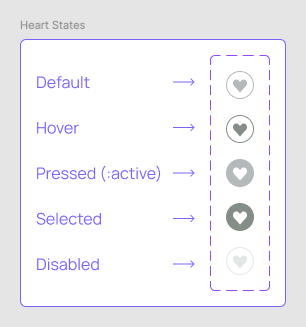
There are still product decisions to make:
- When a user clicks to add, which wishlist should receive the item?
- When removing, do you delete it from a single list, or from all lists it exists in?
These are no longer technical blockers, but intentional UX choices.
Designing Within Constraints
Not every storefront team can—or wants to—invest in custom middleware. In those cases, the most practical approach is to design around what BigCommerce supports natively.
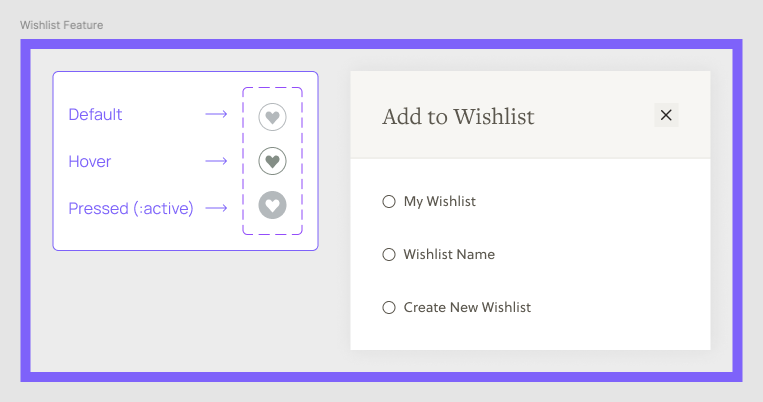
Even without backend logic, you can still create meaningful interaction cues for users:
- Default state – the unselected icon
- Hover state – visual affordance to signal interactivity
- Active/pressed state – immediate feedback that a click occurred
Where BigCommerce diverges from the classic heart toggle is in the “selected” state. Out of the box, the button does not reflect whether a product is already saved. Instead, clicking it opens a modal prompting the user to choose which wishlist to add the item to. Removing an item is even less direct—the user must manage saved products from their My Account section.
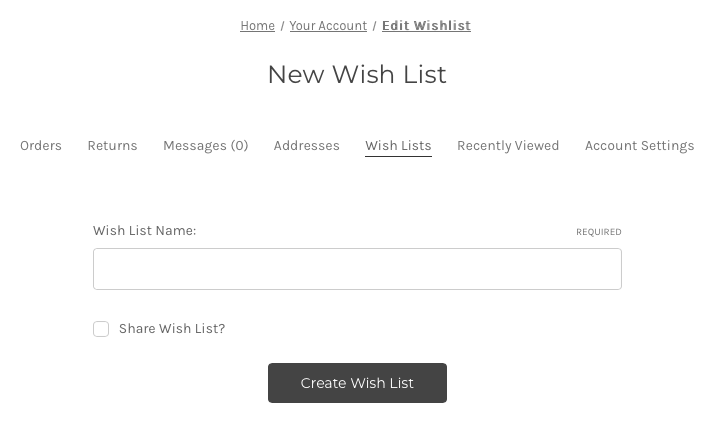
These native states can be implemented cleanly using CSS and minimal JavaScript, giving users immediate feedback on their interactions. But beyond that, the interface cannot indicate “this item is already in a wishlist” without custom logic.
From the Bottom of My Heart
BigCommerce’s multiple-wishlist design is a deliberate product decision. By enabling customers to manage multiple lists, the platform supports richer, more sophisticated shopping behaviors. But that flexibility comes at the expense of simplicity in familiar UI patterns.
A Pinterest-style heart toggle relies on a single source of truth: one list, one state, one action. BigCommerce, by contrast, assumes many lists, each with its own state.
Bridging that gap forces a choice:
- Accept a simplified UX that cannot reflect the true state of saved items, or
- Invest in custom infrastructure—middleware or an app—that reconciles BigCommerce’s complexity with the seamless one-click interaction users expect
There’s no magic solution. On BigCommerce, any “simple” heart toggle requires either a compromise in user experience or a commitment to handling the platform’s inherent complexity.