In e-commerce, a product without an image is essentially invisible. For distributors managing massive catalogs of industrial parts, hardware, or specialized components, obtaining unique photography for every SKU isn’t just difficult—it’s a logistical nightmare.
When products lack images, or use low-quality “Image Coming Soon” placeholders, you hit two major roadblocks:
- Consumer Distrust: Customers perceive a lack of images as a sign of an unmaintained or unreliable site.
- Ad Rejections: Major ad platforms—like Google Merchant Center—will flag or suspend products that don’t meet their image requirements.
The gold standard will always be a high-quality, original photo of the actual product. In fact, Google’s product data specifications are quite strict, explicitly telling merchants not to use placeholders, graphics, or illustrations that don’t show the real item. However for some industries—where catalogs can contain tens or hundreds of thousands of part—obtaining such images is unrealistic.
However, Google rightfully grants an exception which allows generic images to be used for products in these categories:
- Hardware
- Vehicles & Parts
- Computer Software
For B2B companies and industrial suppliers, this exception is a game-changer. It allows us to move away from “broken” looking placeholders and toward dynamically generated branded assets. By using existing data—like manufacturer logos and part numbers—we can programmatically create images that satisfy Google’s requirements and restore customer confidence.
The Solution: Dynamic Branding
Rather than waiting for professional photography that may never come, you can solve this programmatically. By using existing data (Manufacturer and Part Number) and a scripted workflow, you can generate thousands of branded, professional-looking “box” images that satisfy both customers and search engines.
The Anatomy of an Automated Placeholder
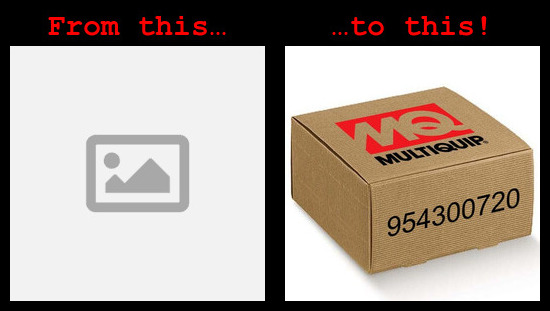
The goal is to move away from a generic “No Image” placeholder and toward a “Branded Box” concept. This gives the user a visual cue of the brand they are buying while providing a clean, professional aesthetic.
The process requires three main components:
- A Base Image: A high-quality photo or render of a generic shipping box.
- Brand Assets: Transparent logos for each manufacturer in your catalog.
- Product Data: A CSV containing the Manufacturer Part Number (MPN) and the Brand name.
How the Automation Works
The “magic” happens via a shell script utilizing ImageMagick, a powerful command-line tool for image manipulation.
- Preparing the Input
The script takes a simple CSV file as an input. This file tells the script which product to target and what text to “print” on the box.
- part_number: The string to be rendered on the label.
- vendor: The identifier used to select the correct brand logo.
- product_id: The unique ID for your e-commerce platform (e.g., BigCommerce or Shopify).
-
The Transformation Logic The script doesn’t just slap text on top of an image. To make the image look realistic, it uses a perspective distortion. This ensures that the part number looks like it is actually printed on the side of the box, following the angle of the package.
Here is a snippet of the core logic:# Generate the label, handle resizing, and apply perspective distortion convert -background none -fill black label:"$MPN" \ -rotate -13 -distort Perspective \ '000,000 020,000 000,083 000,083 353,000 353,000 353,083 333,083' \ "$BASE_IMAGE" +swap \ -gravity center -geometry +105+92 -composite "$OUTPUT_NAME.jpg" - Execution & Upload
You can then iterate through the CSV, generate the unique image for each SKU, and use the platform’s API to:
- Check for existing low-quality images.
- Delete the old assets.
- Upload the new, branded placeholder.
The result is a transformation that takes roughly 1–3 seconds per product, allowing you to update a catalog of 10,000 parts in just a few hours.
The Result
By implementing this automated workflow, e-commerce managers can:
- Clean up the Google Shopping Feed: No more rejections for “generic” or “missing” images.
- Improve Site Search: A consistent look across search results pages makes the site feel more authoritative.
- Scale Effortlessly: As new brands or parts are added to the catalog, generating their images is as simple as running a single command.